Introduction
When it comes to choosing a printer in 2026, most people face the same question:
Should I buy an inkjet printer or a laser printer?
Both technologies have improved significantly over the years, and each offers unique advantages depending on your needs. Inkjet printers excel at photo and color printing, while laser printers deliver speed, efficiency, and sharper text output. To help you make the best choice for your home, business, or work-from-home setup, this in-depth guide explains the differences, advantages, costs, and ideal use cases for both printer types.
This article is designed to be simple, practical, and fully compliant with Microsoft Ads policies. There are no exaggerated claims—just clear information to help you make an informed decision.
- What Is an Inkjet Printer?
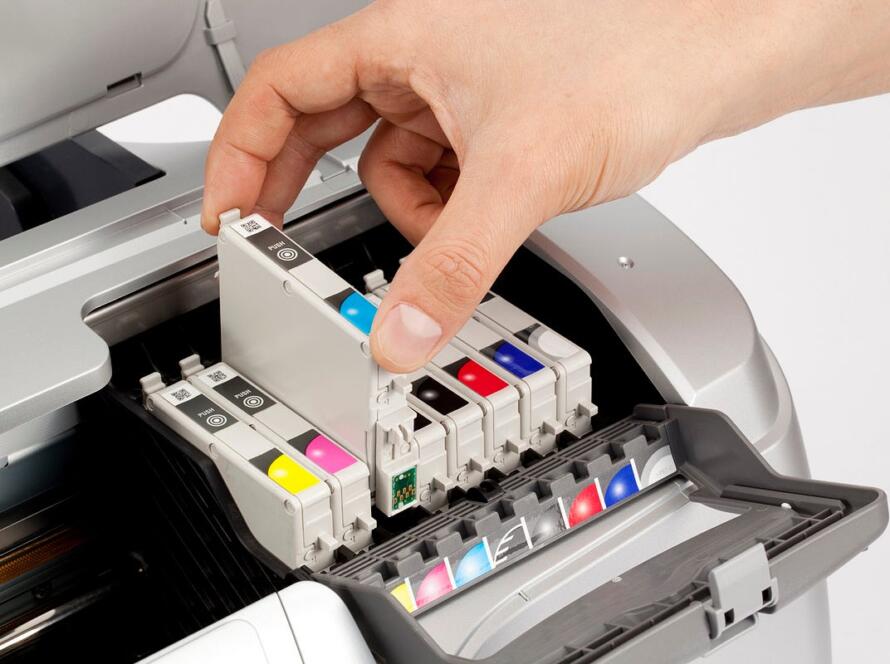
Inkjet printers use liquid ink that is sprayed onto paper through microscopic nozzles. The ink is usually dye-based or pigment-based, allowing for vibrant, detailed, and colorful prints.
1.1 How Inkjet Technology Works
Inkjet printers include:
- A print head with tiny nozzles
- Ink cartridges for color and black
- Software that controls droplet placement
- Paper feed rollers
As the print head moves across the page, droplets of ink form text or images. The result is smooth color transitions and detailed graphics.
1.2 Advantages of Inkjet Printers
Inkjet printers are popular for many reasons:
- Excellent photo quality
- Great for graphics, images, and colored documents
- Affordable purchase price
- Compact designs suitable for small spaces
- Ability to print on various media such as glossy paper, envelopes, and photo paper
1.3 Who Are Inkjet Printers Best For?
Inkjet printers are ideal for:
- Home users
- Families with school-age children
- Students
- Photographers or creative users
- Light to moderate usage
- Occasional color printing
If you need detailed images or vibrant color at home, an inkjet printer is often the better choice.
- What Is a Laser Printer?
Laser printers use toner powder, static electricity, and heat to fuse an image onto paper. They are built for speed, longevity, and high-volume printing.
2.1 How Laser Technology Works
Laser printers contain:
- A toner cartridge
- A drum unit
- A fuser assembly
- A laser/scanner mechanism
The laser draws the image on the drum, toner adheres to the charged areas, and the fuser melts the toner into the paper. This process creates precise, crisp, and smudge-resistant text output.
2.2 Advantages of Laser Printers
Laser printers are known for:
- High-speed printing
- Sharp text clarity
- High page yields
- Lower cost per page
- Long-term reliability
Color laser models also provide decent color printing, although not as vibrant as inkjet photos.
2.3 Who Are Laser Printers Best For?
Laser printers are perfect for:
- Offices and small businesses
- Work-from-home professionals
- Users printing large volumes
- Black-and-white document printing
- Frequent printing needs
If you prioritize speed, efficiency, and long-term savings, a laser printer often delivers the best performance.
- Inkjet vs. Laser: Print Quality Comparison
Both technologies offer good print quality but excel in different areas.
3.1 Inkjet Print Quality
Inkjet printers produce smoother shading, richer tones, and more accurate color reproduction. They are the preferred option for:
- Photos
- Marketing materials
- Graphics
- Color-rich documents
3.2 Laser Print Quality
Laser printers shine in text printing:
- Clean, sharp characters
- Smudge-free output
- High precision at small font sizes
Laser color printing is good for charts and business graphics but is not optimized for professional photography.
- Cost Comparison: Inkjet vs Laser Printers
Understanding cost differences helps avoid long-term expenses.
4.1 Purchase Price
- Inkjet printers: Lower initial cost
- Laser printers: Higher upfront price due to complex hardware
Inkjet models are budget-friendly for casual users, while laser printers pay off for heavy users.
4.2 Ink & Toner Costs
Ink cartridges need replacing more frequently, especially for high-volume color printing. Toner cartridges last longer and may print thousands of pages before replacement.
4.3 Cost Per Page
Laser printers typically have:
- Lower black-and-white cost per page
- Lower color cost per page in high-volume scenarios
Inkjet printers may have higher cost per page, especially if using photo-quality settings.
4.4 Long-Term Maintenance Costs
Inkjet maintenance may include:
- Print head cleaning
- Occasional clogging prevention
- More frequent cartridge replacements
Laser printers may require:
- Drum unit replacement (varies by model)
- Fuser maintenance
- Larger toner cartridges
In most cases, laser printers are more cost-efficient over time.
- Speed Comparison
5.1 Inkjet Printing Speed
Inkjet printers are designed for general users and tend to be slower:
- Typical speed: 5–15 pages per minute (ppm)
- High-end inkjets: up to 20–25 ppm
5.2 Laser Printing Speed
Laser printers excel in speed:
- Typical speed: 20–50 ppm
- Business-grade models: 50+ ppm
For office environments, laser printers save time and support larger workloads.
- Page Yield: Which Lasts Longer?
Page yield refers to how many pages one cartridge can print.
6.1 Inkjet Page Yield
Ink cartridges often print:
- 150–300 pages (standard yield)
- 400–600 pages (high-yield XL)
Photo printing reduces yield due to heavy ink usage.
6.2 Laser Page Yield
Toner cartridges commonly print:
- 1,000–3,000 pages (standard yield)
- 3,000–10,000+ pages (high-yield)
Laser printers are generally better for users who print frequently.
- Size, Design & Space Requirements
7.1 Inkjet Printers
- Compact
- Lightweight
- Ideal for small desks or shelves
7.2 Laser Printers
- Larger footprint
- Heavier
- More internal components
Laser printers are better suited to office spaces or dedicated printer areas.
- Connectivity & Modern Features
Modern printers include various connectivity options, such as:
8.1 Wireless (Wi-Fi) Printing
Works with laptops, desktops, and smart devices.
8.2 Mobile Printing
Most printers support apps or standards like:
- AirPrint (Apple)
- Mopria (Android)
- Manufacturer apps
8.3 Cloud Printing
Useful for team environments but depends on manufacturer support.
8.4 USB/Ethernet Connectivity
USB for direct connections
Ethernet for office networks
Inkjet and laser printers both support these features.
- Media Type Compatibility
Inkjet Printers Support:
- Photo paper
- Glossy paper
- Matte media
- Envelopes
- Specialty papers
Laser Printers Support:
- Standard office paper
- Labels
- Some cardstocks (depending on model)
Inkjet printers are better for creative and specialty printing.
- Pros & Cons Summary
10.1 Inkjet Pros
✔ Great photo quality
✔ Affordable upfront cost
✔ Versatile media compatibility
✔ Compact design
10.1 Inkjet Cons
✘ Higher long-term ink costs
✘ Slower print speed
✘ Ink can dry if not used regularly
10.2 Laser Pros
✔ Fast printing speeds
✔ Sharp text output
✔ High page yield
✔ Lower cost per page
10.2 Laser Cons
✘ Higher upfront cost
✘ Larger footprint
✘ Less suited for professional photo printing
- Which Printer Should YOU Choose?
The decision depends on your printing frequency and the type of documents you produce.
11.1 Choose an Inkjet Printer If:
- You print color photos or graphics
- You need a compact printer
- You print casually
- You want a lower upfront cost
- You prefer versatile paper support
11.2 Choose a Laser Printer If:
- You print high volumes
- You print mainly text
- You want lower long-term costs
- You need fast performance
- You work in an office or home office
- Frequently Asked Questions
Q1. Are laser printers always cheaper to run?
Often yes, especially for black-and-white printing.
Q2. Are inkjet printers good for businesses?
Yes—for businesses needing color graphics or photo-quality prints.
Q3. Do laser printers print photos well?
They can print color images but are not designed for professional photo quality.
Q4. Which printer lasts longer?
Laser printers typically have longer hardware lifespan, but care matters.
Conclusion
Both inkjet and laser printers offer significant advantages, depending on your needs. Inkjet printers provide excellent color quality and versatility, while laser printers excel in speed, efficiency, and long-term cost savings.
By considering:
- Print quality
- Speed
- Cost per page
- Media compatibility
- Daily usage
- Long-term maintenance
—you can select the best printer for your home or office setup.
Choosing the right printer ensures smoother workflows, better productivity, and a hassle-free printing experience for years to come.